
Harbor
Your controls. Your layout.
Beta 22 · A more cohesive Harbor
Physical-device testing is pending for beta22. Fine edges and restrained tonal depth connect Control Center, the editor and profile selection. No blur or dimming is added behind Control Center. Existing custom colors and sheet materials remain available, with a contrast guard that suppresses unsafe decorative washes.
The editor uses consistent touch targets and preserves space for settings on shorter displays. Long profile names wrap, large text stays scrollable and action rails mirror in RTL. Profile and Focus panels remain interruptible during short fades, with protection against stale callbacks.
The saved Hide home indicator option now remains eligible inside Harbor's editor. Opening an external editor sheet or leaving Harbor restores native policy; returning from a picker restores Harbor's preference. Actual hiding on SpringBoard still needs phone confirmation. Unsaved drafts do not change the live preference.
Final simulator suites pass 16,215 assertions on Pro Max and 16,216 on SE, plus 54 asynchronous editor/panel checks, 18 reduced-motion panel checks and 274 accessibility-override checks per size. These include repeated matrices, not that many independent features. Forty final sample captures, memory-backed simulator slider drags, host checks and RootHide package validation pass. They do not establish native phone controls, VoiceOver experience or sustained frame pacing.
Beta21's continuous low-level slider fill, corrected sizing, layouts and profile schema are preserved. Focus switching remains unavailable; the moon opens Harbor's read-only panel and matching remains off by default. The new appearance engine and custom icon picker are planned, not included. No external theme importer, pages, dock, switcher, Island or notification module ships here. No iOS 17.1-or-later support is claimed.
Compact, expandable, personal.
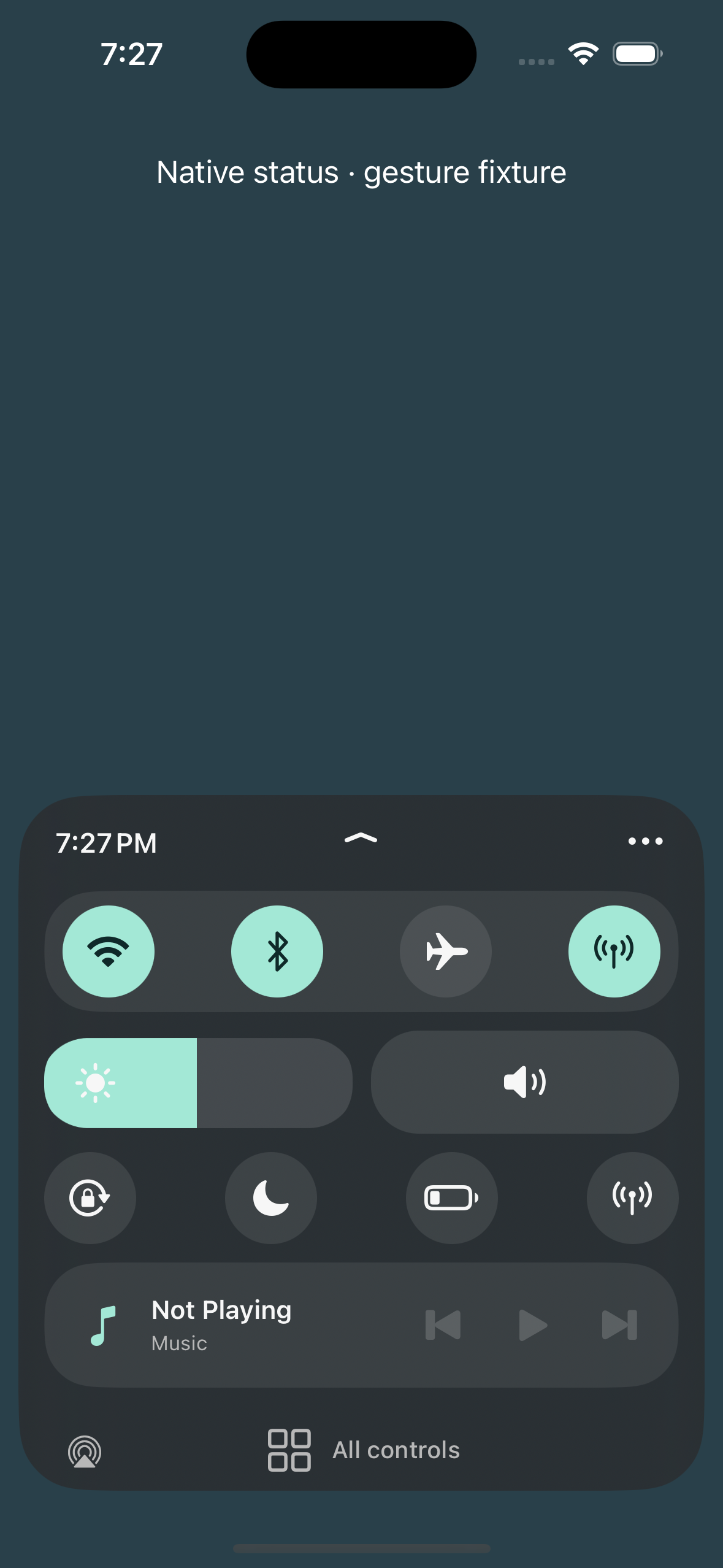
- A bottom sheet with circular connectivity controls, horizontal brightness and volume pills, shortcuts and Now Playing.
- Independent compact and expanded arrangements with individual live controls. Hold a control to drag it, hide or restore controls, and use Undo/Redo before Done or Cancel. Legacy section layouts remain available until an individual grid is saved.
- Four theme presets plus custom accent and surface colors, materials, shapes, opacity, radius, spacing, edge-to-edge/inset sizing and temporary home-indicator preference.
- Up to 12 saved profiles with copy, rename, manual selection, reset and delete.
- Interruptible slide/fade presentation, Reduce Motion and Transparency, Dynamic Type and accessibility labels.
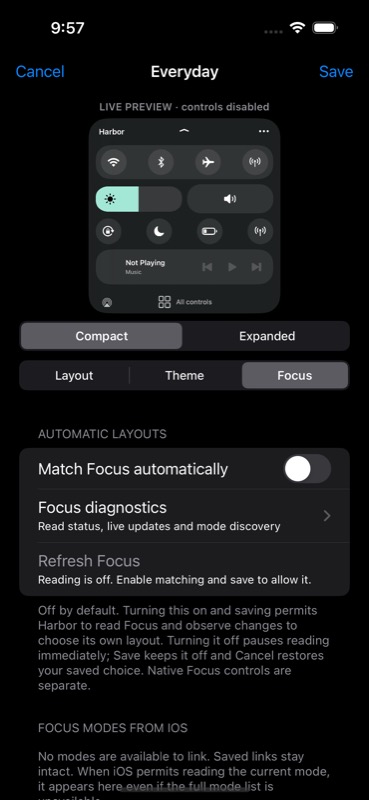
Focus matching is your choice.
Automatic matching is off by default. Manual profiles work without it. Beta 7 fixes the earlier reader-startup bug: Harbor starts no Focus reader when disabled. Legacy enabled flags and backup recovery cannot silently enable access.
To opt in, open the editor's Focus tab, turn on Match Focus automatically, then Done. An unsaved On draft does not start reading. Off pauses reading immediately; Done keeps it off, while Cancel restores your saved choice.
The adapter reads Focus to select Harbor's layout; it contains no system Focus activation or setting writes. The Focus controls shortcut opens Harbor's read-only panel. It does not open Apple's selector or switch modes. An already-running read may finish after disabling, and an existing listener may need cleanup.
Real SpringBoard Focus integration remains unverified. Private APIs can fail, stall or change, and the ordinary simulator app is denied service access. Automatic matching can stay off indefinitely. Read the audit and test boundaries.
Controls and recovery.
Connectivity, Rotation Lock and Low Power buttons forward existing native control actions when available. Brightness, native volume, AirPlay and media controls remain accessible. Missing or unsupported controls hand off to Apple's UI.
Tap or drag the chevron for expanded shortcuts. Native-panel shortcuts hand off to Apple's UI; close and reopen to return to Harbor. There is no All controls footer. Disable Harbor in Settings to restore full native Control Center. Landscape and iPad retain the native layout.
After updating
Refresh this source in Sileo and confirm 0.1.0~beta22. After installing, restart SpringBoard through your environment's supported UI and reopen Settings. Enable Settings injection if your environment requires it for PreferenceLoader. Settings → Harbor → Enable Harbor defaults on. Open Control Center with the usual downward swipe from the top-right, in portrait.
First open Profiles and the editor. Compare your themes and compact/full controls. With Hide home indicator enabled, check the dashboard and editor, open and dismiss a picker, then leave Harbor. Repeat with the option off. Confirm normal system behavior returns. The saved preference applies; draft changes wait for Done.
Then slowly drag brightness and volume down through the last quarter, then back up. The colored edge should keep moving instead of disappearing early. Try faster direction changes and the minimum/maximum endpoints, then hardware volume buttons, audio route changes and reopening Harbor. Compare compact and full control sizes and your usual themes. These are phone checks, not guarantees from the simulator.
Then hold and move a control, then move it again while already editing. Release near a new cell and confirm its final position. Test one-step Undo and Cancel, then Done and reopening. Confirm ordinary slider swipes remain separate from stationary edit holds. Check button feedback while media availability changes.
Then tap the moon. Harbor's Focus information panel should open without stock Control Center or its selector. Use Done to return, then reopen the panel and dismiss Control Center. Confirm the current Focus and matching preference remain unchanged. Mode switching is unavailable in this build.
Open Profiles and appearance → Edit layout & theme → Theme. Check that the preview matches your saved positions, hidden controls and compact/expanded arrangement. Change size, accent, shape and inset; the actual layout should stay unchanged until Done. The control and media snapshot stays paused during editing. Then scroll to Control size and compare Original 100% with Compact 75%. Round controls and section heights should shrink without pulling the layout inward; native slider dimensions stay fixed. Test Undo/Redo and Cancel, then repeat with Done and reopen to check persistence. Original 100% restores the full size. Open a color picker or rename alert and dismiss Control Center; confirm no orphaned sheet or crash. Keep Focus matching off initially and confirm brightness and volume respond. Hold one control still, then move without lifting your finger; test Undo/Redo. Hide and restore a control. Cancel should preserve the saved arrangement. Repeat and use Done, reopen Harbor, and verify both the saved positions and brightness/volume. Switch compact/expanded and confirm the default profile remains unchanged.
The sliders icon still opens Profiles and appearance for Theme, Focus and profile options. Normal control taps and early slider movement keep their ordinary behavior; stationary holds can arrange the control. The Edit button remains as an accessibility alternative. Test the Theme edge and indicator switches, then dismiss Harbor or open native controls and confirm normal system gestures and the home indicator return. If another settings writer changes the library during editing, Done rejects the stale save and keeps the draft open rather than overwriting newer data.
If Harbor is absent, open Settings → Harbor → Refresh status. The report includes its build version and time; it describes the last recorded event. Confirm native recovery and the master switch before relying on Harbor.
Rollback and remaining phone checks
Unchanged rollback downloads: beta21 · beta20 · beta19 · beta18 · beta17 · beta16 · beta15 · beta14 · beta13 · beta12 · beta11 · beta10 · beta9.
Downgrade caveat: beta21 is the immediate rollback, preserving the same profile schema, corrected sizing, contained read-only Focus panel and continuous slider fill. It restores the previous editor styling and dashboard-only home-indicator eligibility. Beta20 restores the earlier slider artwork. Beta18 preserves corrected sizing but its moon button returns to the native Focus selector. Beta17 preserves percentages and grid positions but restores the older inward-narrowing sizing behavior. Beta16 also retains those settings. Beta15 restores original size and may drop the new size key when saving, while retaining individual grid placement. Older beta13 does not implement the new edge options and may discard those optional theme keys on save. Beta12 displays the legacy section layout. Saving profiles in beta12 removes beta13's individual-control placement data. Preserve a beta13 profile-library backup before using an older editor; do not expect the grid to survive an older-version save.
Beta22 needs phone checks for control behavior, gesture conflicts, interruptions, lock-screen use, persistence, VoiceOver, safe recovery, tweak coexistence and sustained frame pacing. This is a development beta.
Disable Harbor in Settings, or uninstall through your RootHide package manager and restart SpringBoard using that environment's supported UI. If needed, use its established safe-mode or disable-tweak recovery procedure.
This is a package-only publication. Earlier beta11 source and build instructions remain available; they are not the beta22 source.